Privacy has always been one of Zano’s core features, and the project continues to add new ways for users to protect their online activity. A recent update introduces SOCKS5 proxy relay, allowing Zano wallets to send transactions and Proof-of-Stake (PoS) block submissions through a proxy such as Tor.
This feature helps hide your public IP address from the node that broadcasts your transaction, adding another layer of network privacy while keeping the wallet’s normal operation unchanged.
Here’s a simple overview of how it works and why it matters.
Table of Contents
- What Is a SOCKS5 Proxy?
- Why Use a SOCKS5 Proxy?
- How Does It Work?
- What Do You Need?
- Relay Options
- Example Configurations
- Why This Feature Matters
- Sources
1. What Is a SOCKS5 Proxy?
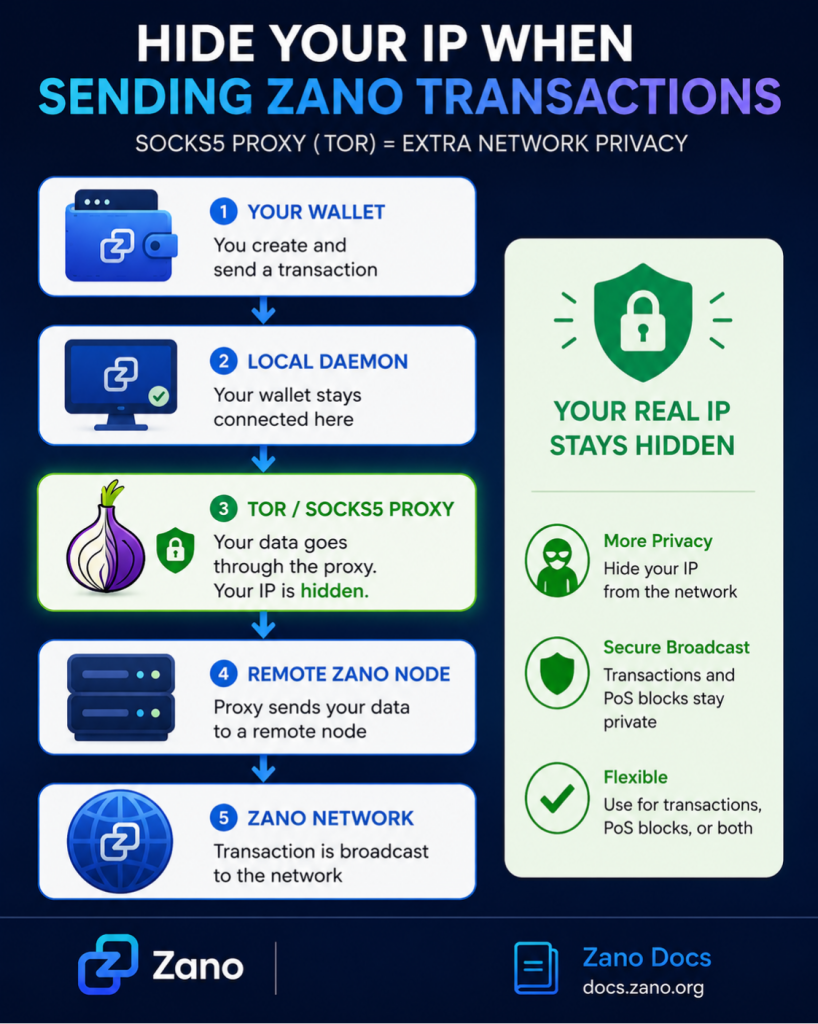
A SOCKS5 proxy is a server that sits between your wallet and the Zano network.
Instead of your wallet sending data directly to the network, it first sends it to the proxy. The proxy then forwards the data to a remote Zano node.
As a result, the network sees the proxy’s IP address instead of your own.
One of the most commonly used SOCKS5 proxies is Tor, which is designed to improve online privacy and anonymity.
2. Why Use a SOCKS5 Proxy?
Normally, when you broadcast a cryptocurrency transaction, the receiving node can see the IP address it came from.
Using a SOCKS5 proxy helps protect your privacy by:
- Hiding your public IP address
- Reducing network-level tracking
- Making it more difficult to connect blockchain activity to your internet connection
- Allowing both transactions and staking activity to be relayed privately
Your wallet will still synchronize with your local Zano daemon exactly as before. Only transaction broadcasts and PoS block submissions are sent through the proxy.
3. How Does It Work?
The process is simple:
- Your wallet connects to your local Zano daemon.
- When you send a transaction or submit a PoS block, the wallet sends it to a SOCKS5 proxy.
- The proxy forwards the data to a remote Zano node.
- The Zano network receives the broadcast while your real IP address remains hidden.
This allows users to improve network privacy without changing how the wallet normally syncs with the blockchain.
4. What Do You Need?
Before using the feature, you’ll need:
- A running SOCKS5 proxy, such as Tor
- A local Zano daemon
- A remote Zano node to relay your transactions
For most users, the recommended setup is:
- Tor Browser, which exposes a SOCKS5 proxy while it’s running.
- node.zano.org, Zano’s public relay node.
5. Relay Options
Zano allows users to decide exactly what they want to send through the proxy.
You can choose to relay:
- Transactions only
- Proof-of-Stake (PoS) blocks only
- Both transactions and PoS blocks
You can also use different proxy settings for transactions and staking, giving advanced users additional flexibility.
6. Example Configurations
The official Zano documentation includes several setup examples, including:
- Relaying transactions through Tor using HTTPS
- Relaying transactions through Tor using HTTP
- Routing both transactions and PoS block submissions through Tor
- Configuring SOCKS5 relay for the Zano testnet
The documentation also provides the command-line options needed to specify your SOCKS5 proxy and remote relay node, making it easy for users to configure the feature.
7. Why This Feature Matters
Privacy isn’t only about keeping wallet balances and transaction details confidential. Network privacy is just as important because every transaction broadcast leaves behind metadata, including the IP address of the broadcasting node.
With SOCKS5 proxy relay support, Zano users can reduce the exposure of this information by routing broadcasts through Tor or another compatible proxy. This creates another layer of privacy that complements Zano’s confidential transactions and other privacy-focused technologies.
As privacy concerns continue to grow across the cryptocurrency industry, features like SOCKS5 proxy relay give users greater control over how they interact with the blockchain.
8. Source
- Zano — Original X Post
- Zano Docs – Sending Transactions and PoS Blocks Through a SOCKS5 Proxy
- Zano Official Website
Disclaimer: ZanoNews.com is an independent news and information website. This article is for informational purposes only and does not constitute financial or investment advice.